

At a glance
How it works
Your plan
Add credits
GST
Dashboard terms
Refunds
What changed: Postpaid → Prepaid
The calculations side by side
Your selling plan
Your plan is a set of tiers keyed to cumulative sales for the cycle. The lowest tier is a flat plan amount; higher tiers charge a percentage of order value, priced per payment type.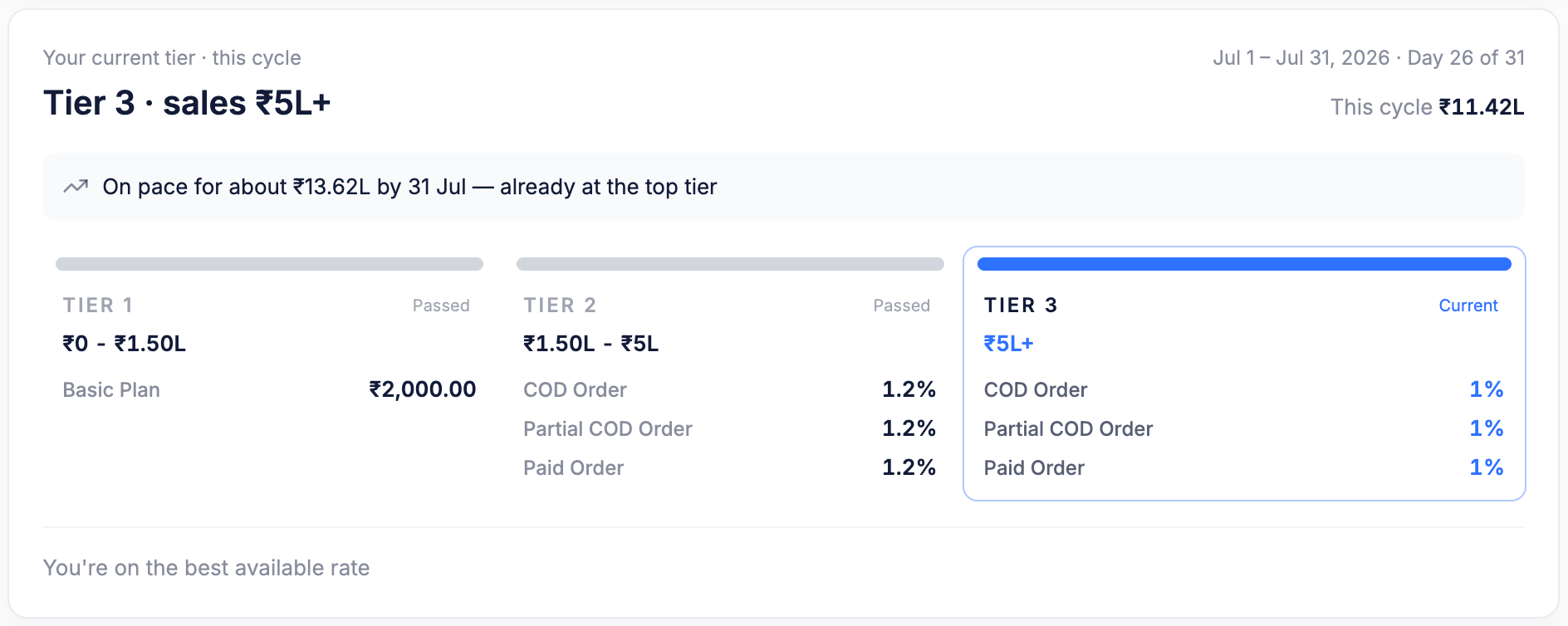
Settings → Billing & Usage — the tier card shows your current tier, every threshold, and the rates that apply.
- Your current tier · this cycle — the tier your cumulative sales have reached. Here,
Tier 3 · sales ₹5L+. - Cycle dates and progress —
Jul 1 – Jul 31, 2026 · Day 26 of 31, withThis cycle ₹11.42Las cumulative sales so far. - Pace projection —
On pace for about ₹13.62L by 31 Jul, so you can see a tier change coming. - Tier cards — each shows its sales range and its rates. Tiers you’ve moved past are marked
Passed; the one you’re on is markedCurrent. - Best-rate note —
You're on the best available rateappears when you’re on the lowest-priced tier available to you.
Rates are per payment type
From Tier 2 upward, rates are quoted separately for each payment type, so a plan can price COD differently from prepaid:How prepaid billing works
Charging starts with your first order
The plan amount is allocated daily
Cumulative GMV is checked
Tier changes trigger reconciliation
- A credit is added if more than the required amount was already collected.
- A debit is applied if less than the required amount was collected.
- Charges from that point on use the higher tier.
Worked examples
Example A — you don't cross the threshold
Example A — you don't cross the threshold
Example B — you cross a threshold mid-month
Example B — you cross a threshold mid-month
TIER 2 → TIER 3 row, taking the balance from ₹7,654.18 to ₹8,617.61.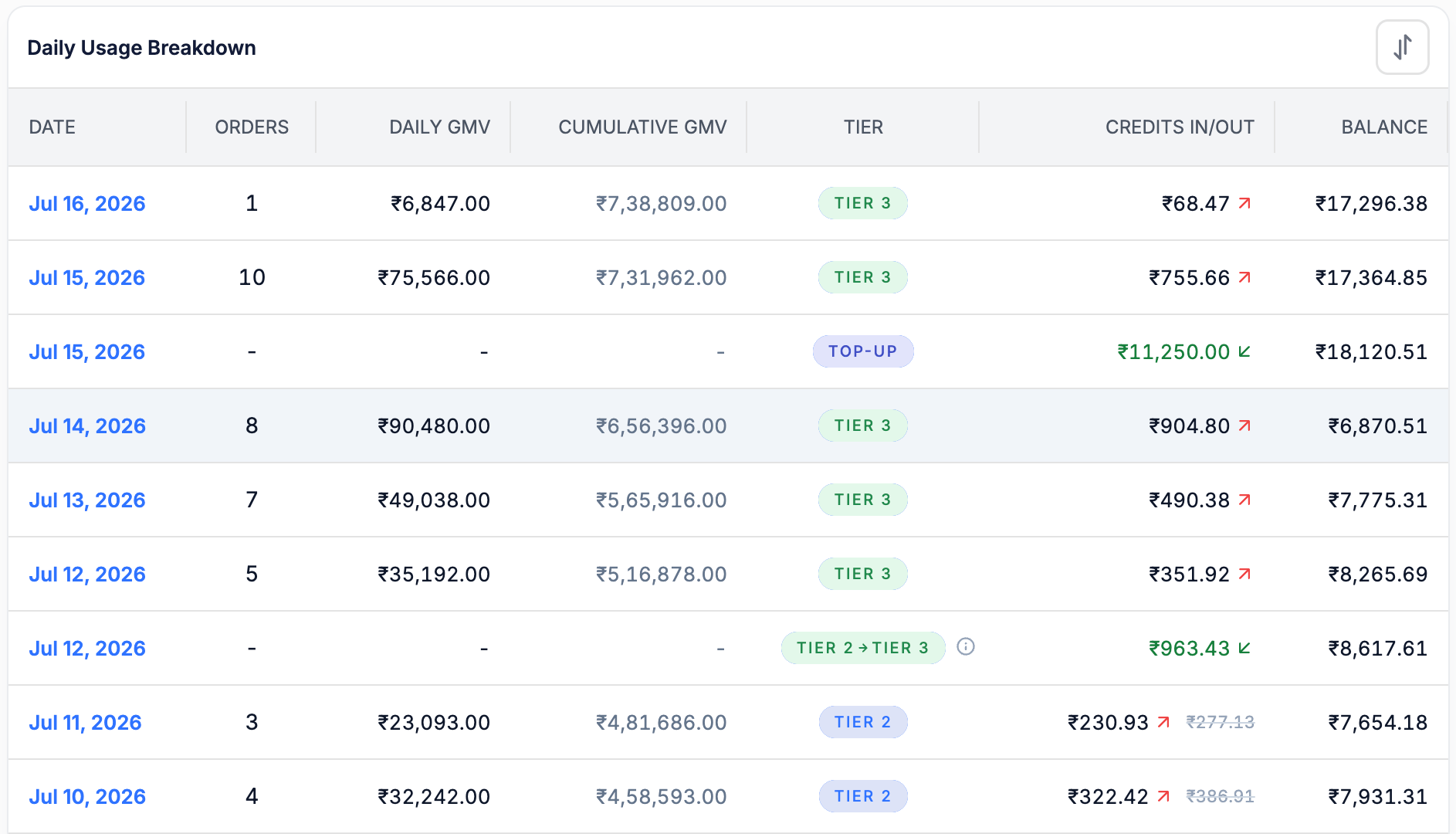
Daily Usage Breakdown — a TOP-UP row and a TIER 2 → TIER 3 reconciliation row sitting between normal usage rows.
- Usage rows — one per day, tagged with the tier that applied (
TIER 3,TIER 2,TIER 1). TOP-UProws — a recharge landing in your balance. Here₹11,250.00on Jul 15, taking the balance from ₹6,870.51 to ₹18,120.51. Orders, GMV, and tier are blank because a top-up isn’t usage.- Tier transition rows — tagged
TIER 2 → TIER 3, carrying the reconciliation credit or debit for the crossing. Hover the ⓘ icon for the breakdown.
How to add credits
Open Settings
Select Billing & Usage
Click Add Credits
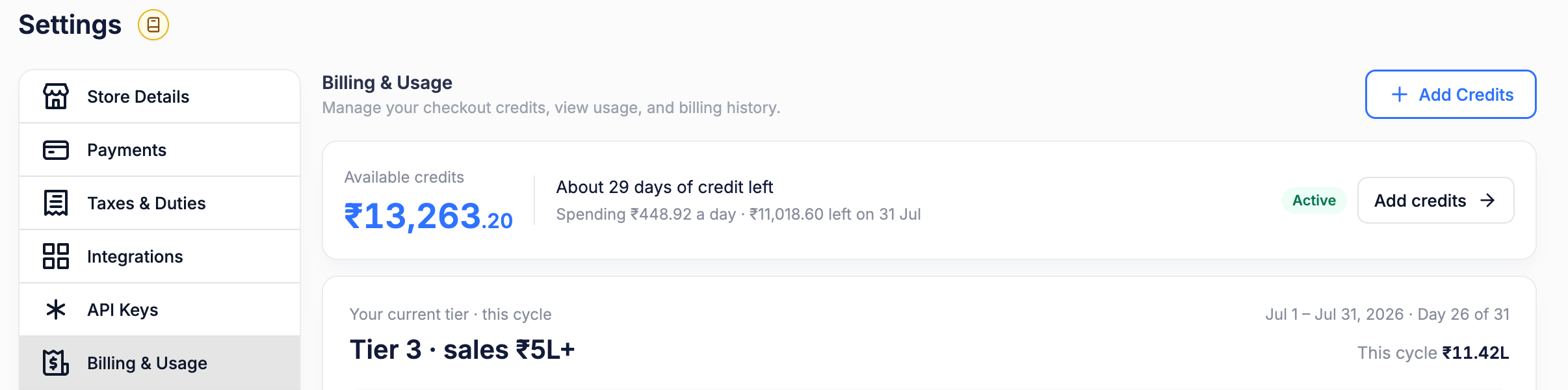
Settings → Billing & Usage — Add Credits sits in the page header; Add credits on the balance strip opens the same flow.
TOP-UP row appears in your usage history.
GST and Taxes
GST at 18% is added on top of your recharge amount. The credits added to your balance equal the pre-tax amount you chose.- Your invoice shows the sub-total, GST, and total as separate lines, along with any plan or add-on items billed in the same invoice.
- Promotional or bonus credits are not taxed — GST applies only to the amount you pay for.
- Add your GSTIN under Store Details so it appears on your invoices and you can claim input credit.
Recharge and balance requirements
If you have an outstanding amount
Your recharge must cover the outstanding amount and leave a minimum balance of ₹2,000:How much to recharge
Where to view your billing plan
Go to Settings → Billing & Usage. Everything about your billing lives on this one page: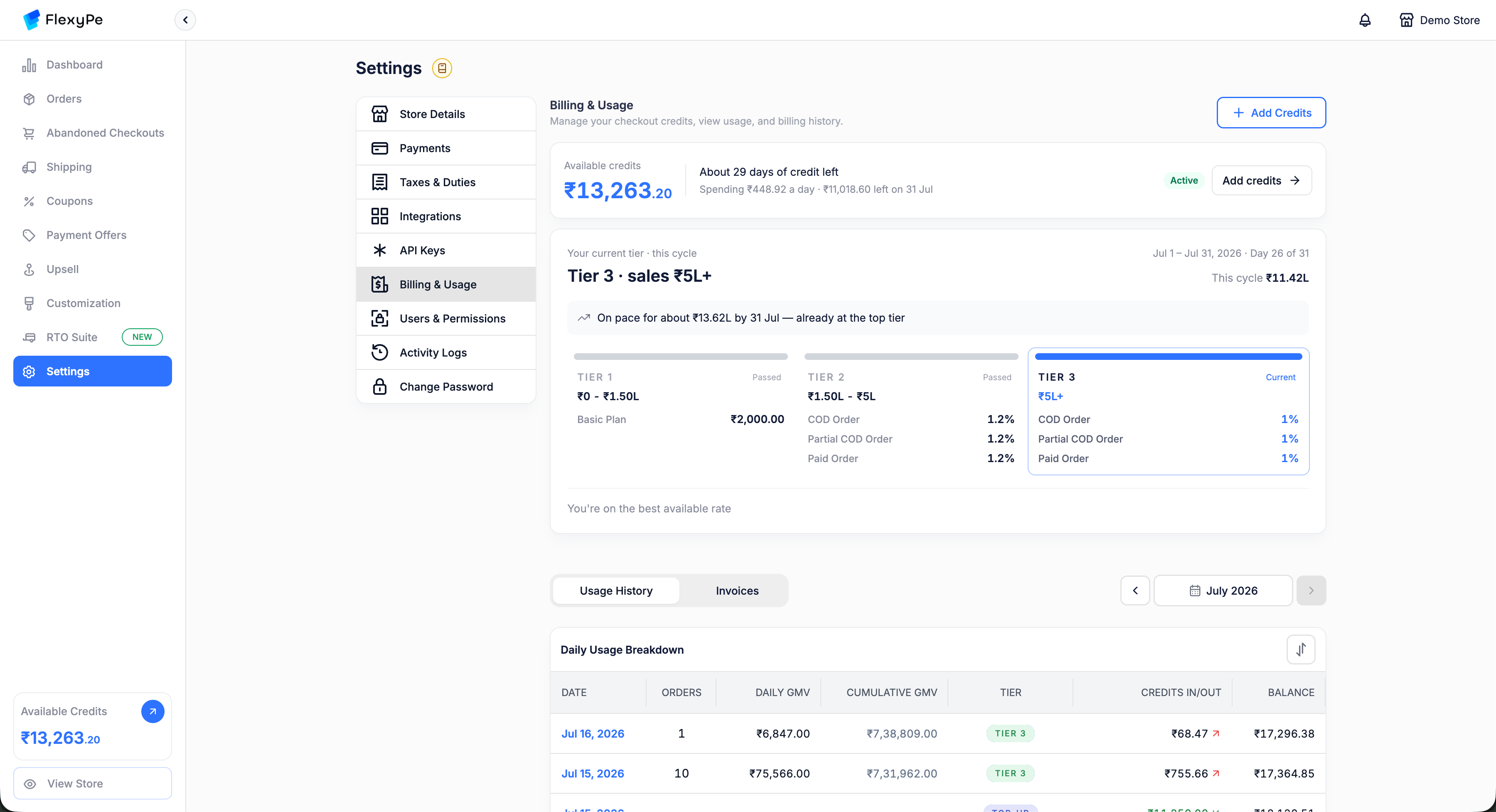
The complete Billing & Usage page: balance strip, tier card, and Daily Usage Breakdown, with Usage History / Invoices tabs and a month picker.
Billing analytics
The balance strip is your early-warning system — it shows a shortfall coming before it happens.
The balance strip on Settings → Billing & Usage.
- A rising daily spend means credits are being consumed faster — usually because sales are growing or you’ve moved up a tier.
- A positive projected balance means your credits are expected to last through the cycle.
- Days of credit left tells you when to recharge.
- If the projected balance is low or negative, recharge now.
Daily usage breakdown
The Daily Usage Breakdown table shows exactly how each day’s charge was calculated.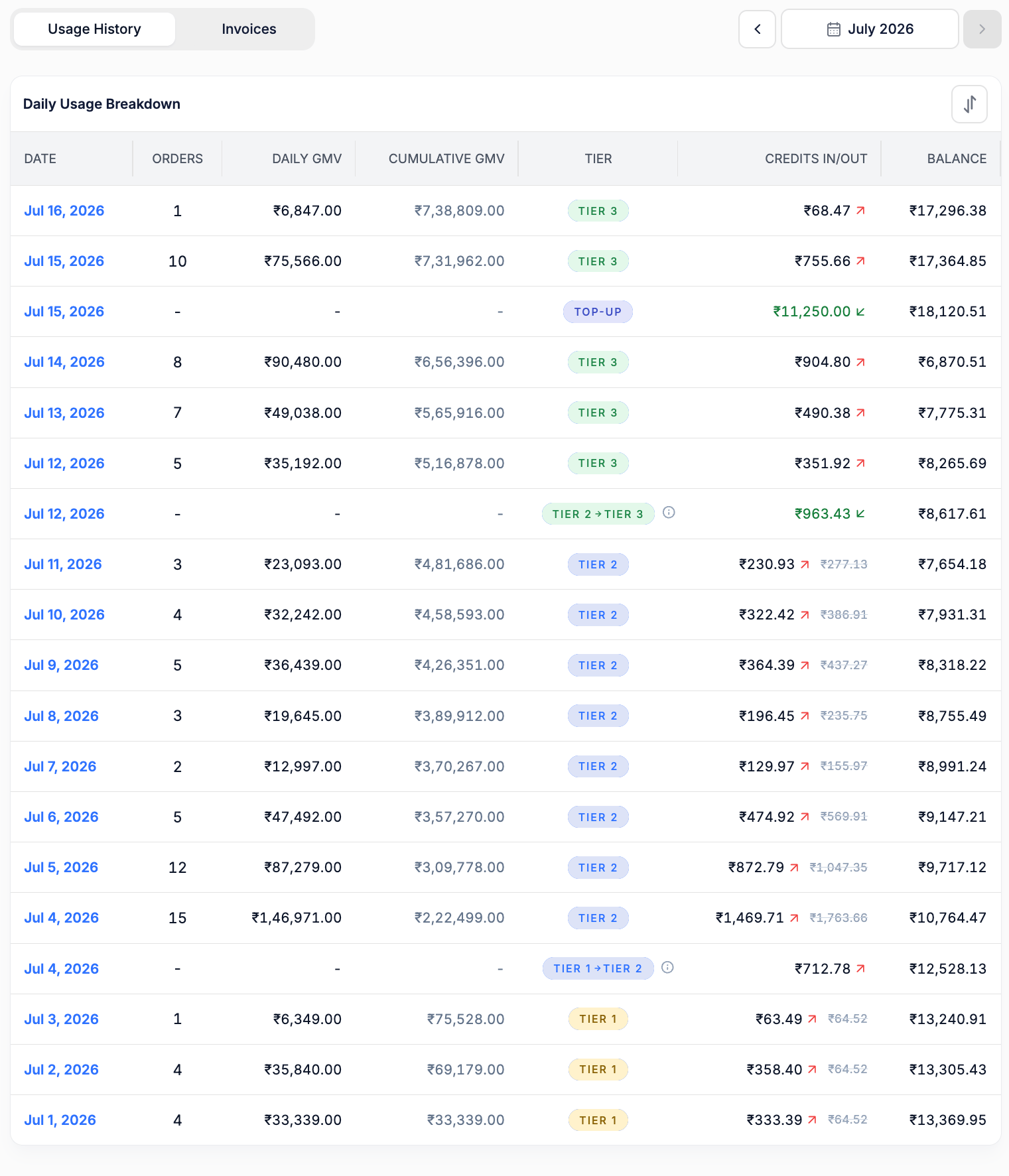
A full cycle in the Daily Usage Breakdown — Tier 1 at the bottom (Jul 1) rising to Tier 3, with a tier transition on Jul 4 and Jul 12 and a top-up on Jul 15.
TIER 1 on Jul 1, crosses into TIER 2 on Jul 4 and TIER 3 on Jul 12 — each crossing getting its own transition row — and takes a top-up on Jul 15.
Dashboard terms explained
Every term below is a label you’ll actually see on Settings → Billing & Usage.Frequently asked questions
If I go live on the 14th, do I pay the full plan amount for the month?
If I go live on the 14th, do I pay the full plan amount for the month?
Has my selling plan changed?
Has my selling plan changed?
When does charging begin?
When does charging begin?
What happens when I cross my tier threshold?
What happens when I cross my tier threshold?
Can my account have more than two tiers?
Can my account have more than two tiers?
Why does my rate differ for COD and prepaid orders?
Why does my rate differ for COD and prepaid orders?
What is a TOP-UP row in my usage history?
What is a TOP-UP row in my usage history?
Why do credits or debits appear in my usage history?
Why do credits or debits appear in my usage history?
What happens if I have an outstanding balance?
What happens if I have an outstanding balance?
How much should I recharge?
How much should I recharge?
Is GST included in the amount I recharge?
Is GST included in the amount I recharge?
Can I get a refund for credits I haven't used?
Can I get a refund for credits I haven't used?
How long does a refund take?
How long does a refund take?
Summary
- Your selling plan is unchanged; only the billing timing moved from postpaid to prepaid.
- Charging starts with your first processed order.
- The lowest tier’s plan amount is divided across the 30 or 31 days of the month, and you pay only for days used.
- Higher tiers charge a percentage of order value, priced separately for COD, Partial COD, and Paid orders.
- Cumulative sales determine your tier; crossing a threshold triggers reconciliation as a credit or debit on its own row.
- 18% GST is added on top of your recharge.
- A recharge must clear any outstanding amount and leave ₹2,000 minimum balance.
- Keep a buffer of 4–5 days of expected charges so checkout is never interrupted.
Cancellation and refunds
Cancellation
You may cancel within 7 days of your first billing, and that cancellation is eligible for a refund.Refunds
Important
- Credits are non-refundable after the initial 7-day period.
- No exceptions to the refund policy will be considered.
Legal and compliance
Terms acceptance
Terms acceptance
Governing law
Governing law
Data protection
Data protection