> ## Documentation Index
> Fetch the complete documentation index at: https://docs.flexype.io/llms.txt
> Use this file to discover all available pages before exploring further.
# FlexyPe Billing and Payments
> How prepaid billing works — tiers, daily charges, GST, recharges, and every term you'll see in the dashboard.
FlexyPe bills you from a **prepaid credit balance**. You add credits to your account, and your daily usage charges are deducted from that balance as the month progresses.
**We've moved from Postpaid to Prepaid billing.** Your selling plan has not changed — only **when** charges are calculated and collected. Nothing about your rates, tiers, or thresholds changes because of this migration.
## At a glance
Charging starts with your first order and is calculated daily.
A flat plan amount at the lowest tier, percentage rates above it.
Recharge from **Settings → Billing & Usage** in three clicks.
18% GST is added on top of your recharge amount.
Runway, burn, cumulative GMV, credits in/out — explained.
The questions merchants ask most about billing.
## What changed: Postpaid → Prepaid
| | Earlier: Postpaid | Now: Prepaid |
| ------------------------ | ----------------------------- | -------------------------------------- |
| **When GMV is measured** | Once, at the end of the month | Cumulatively, every day |
| **When you're charged** | At the end of the month | From your first processed order, daily |
| **How you pay** | Invoice after the cycle | Credits you add in advance |
| **Your selling plan** | Unchanged | Unchanged |
The change is in timing only. The tier you land in and the rate you pay for that tier are exactly what your plan says they are.
### The calculations side by side
```text Postpaid theme={null}
Monthly charge = charge applicable to month-end GMV, as per the respective tier
```
```text Prepaid theme={null}
Daily charge = cumulative GMV from day 1 through day X
→ identify the applicable tier
→ charge accordingly
```
The charge for **day X** is calculated on the **morning of day X+1**.
## Your selling plan
Your plan is a set of **tiers** keyed to cumulative sales for the cycle. The lowest tier is a **flat plan amount**; higher tiers charge a **percentage of order value, priced per payment type**.
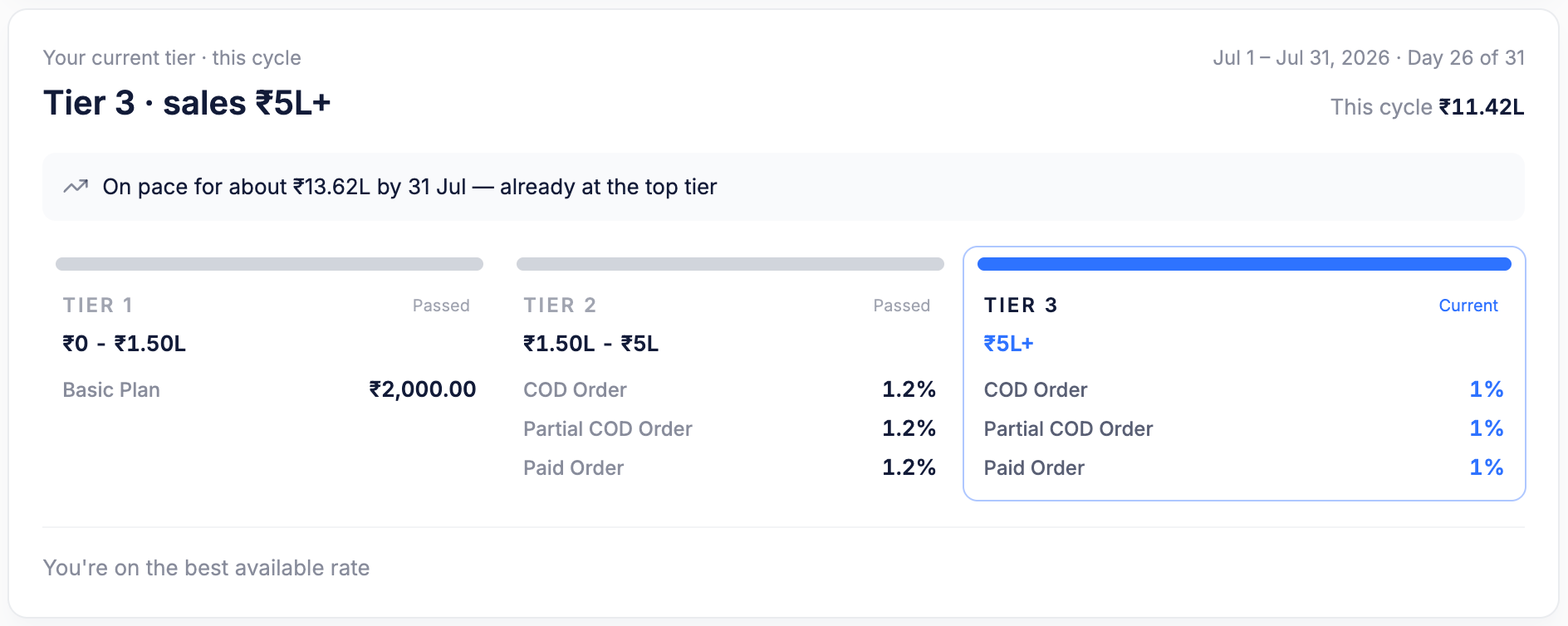 Reading the card above:
1. **Your current tier · this cycle** — the tier your cumulative sales have reached. Here, `Tier 3 · sales ₹5L+`.
2. **Cycle dates and progress** — `Jul 1 – Jul 31, 2026 · Day 26 of 31`, with `This cycle ₹11.42L` as cumulative sales so far.
3. **Pace projection** — `On pace for about ₹13.62L by 31 Jul`, so you can see a tier change coming.
4. **Tier cards** — each shows its sales range and its rates. Tiers you've moved past are marked `Passed`; the one you're on is marked `Current`.
5. **Best-rate note** — `You're on the best available rate` appears when you're on the lowest-priced tier available to you.
For this account:
| Tier | Sales range | Charges |
| ---------- | ------------ | --------------------------------------------------------- |
| **Tier 1** | ₹0 – ₹1.50L | Basic Plan — ₹2,000.00 |
| **Tier 2** | ₹1.50L – ₹5L | COD Order 1.2% · Partial COD Order 1.2% · Paid Order 1.2% |
| **Tier 3** | ₹5L+ | COD Order 1% · Partial COD Order 1% · Paid Order 1% |
### Rates are per payment type
From Tier 2 upward, rates are quoted separately for each payment type, so a plan can price COD differently from prepaid:
| Payment type | What it covers |
| --------------------- | --------------------------------------------------- |
| **COD Order** | Full cash-on-delivery order |
| **Partial COD Order** | Part paid online at checkout, remainder on delivery |
| **Paid Order** | Fully prepaid at checkout |
The tiers, thresholds, and rates above are from a demo account. Yours may differ — **Settings → Billing & Usage** always shows the values that apply to your business.
## How prepaid billing works
Billing calculation begins as soon as your first order is processed. No order, no charge.
The flat plan amount for your lowest tier is divided by the number of calendar days in the month:
| Month length | Daily charge on a ₹2,000 Basic Plan |
| ------------ | ----------------------------------- |
| 30 days | ₹2,000 ÷ 30 = **₹66.67** |
| 31 days | ₹2,000 ÷ 31 = **₹64.52** |
You're charged only for the days you actually use the service.
Each day, the system adds up GMV from the first day of the cycle through the current day and identifies the tier that applies to that total.
When cumulative GMV crosses a tier threshold, the charge is recalculated for the cycle so far:
* A **credit** is added if more than the required amount was already collected.
* A **debit** is applied if less than the required amount was collected.
* Charges from that point on use the higher tier.
## Worked examples
Assumptions: ₹2,000 Basic Plan for Tier 1 · June (30 days) · service starts June 10 · 21 days of service · the Tier 1 ceiling is **not** crossed.
| Calculation | Amount |
| ----------------- | --------------------------- |
| Daily plan charge | ₹2,000 ÷ 30 = ₹66.67 |
| Service days | 21 |
| **Total charge** | ₹66.67 × 21 = **₹1,400.07** |
You pay for 21 days of service, not the full ₹2,000.
| Stage | What happens |
| --------------- | ---------------------------------------------------------- |
| Before crossing | Charges are applied at your current tier's rate |
| On crossing | Cumulative sales are recalculated against the new tier |
| Reconciliation | The difference posts as a credit or a debit on its own row |
| After crossing | The new tier's rate applies to subsequent charges |
A real crossing, from the table below: on **Jul 12** cumulative sales passed ₹5L, moving the account from Tier 2 (1.2%) to Tier 3 (1%). Because the new tier is cheaper, the cycle so far had been over-collected — so a **₹963.43 credit** posted on a `TIER 2 → TIER 3` row, taking the balance from ₹7,654.18 to ₹8,617.61.
Reading the card above:
1. **Your current tier · this cycle** — the tier your cumulative sales have reached. Here, `Tier 3 · sales ₹5L+`.
2. **Cycle dates and progress** — `Jul 1 – Jul 31, 2026 · Day 26 of 31`, with `This cycle ₹11.42L` as cumulative sales so far.
3. **Pace projection** — `On pace for about ₹13.62L by 31 Jul`, so you can see a tier change coming.
4. **Tier cards** — each shows its sales range and its rates. Tiers you've moved past are marked `Passed`; the one you're on is marked `Current`.
5. **Best-rate note** — `You're on the best available rate` appears when you're on the lowest-priced tier available to you.
For this account:
| Tier | Sales range | Charges |
| ---------- | ------------ | --------------------------------------------------------- |
| **Tier 1** | ₹0 – ₹1.50L | Basic Plan — ₹2,000.00 |
| **Tier 2** | ₹1.50L – ₹5L | COD Order 1.2% · Partial COD Order 1.2% · Paid Order 1.2% |
| **Tier 3** | ₹5L+ | COD Order 1% · Partial COD Order 1% · Paid Order 1% |
### Rates are per payment type
From Tier 2 upward, rates are quoted separately for each payment type, so a plan can price COD differently from prepaid:
| Payment type | What it covers |
| --------------------- | --------------------------------------------------- |
| **COD Order** | Full cash-on-delivery order |
| **Partial COD Order** | Part paid online at checkout, remainder on delivery |
| **Paid Order** | Fully prepaid at checkout |
The tiers, thresholds, and rates above are from a demo account. Yours may differ — **Settings → Billing & Usage** always shows the values that apply to your business.
## How prepaid billing works
Billing calculation begins as soon as your first order is processed. No order, no charge.
The flat plan amount for your lowest tier is divided by the number of calendar days in the month:
| Month length | Daily charge on a ₹2,000 Basic Plan |
| ------------ | ----------------------------------- |
| 30 days | ₹2,000 ÷ 30 = **₹66.67** |
| 31 days | ₹2,000 ÷ 31 = **₹64.52** |
You're charged only for the days you actually use the service.
Each day, the system adds up GMV from the first day of the cycle through the current day and identifies the tier that applies to that total.
When cumulative GMV crosses a tier threshold, the charge is recalculated for the cycle so far:
* A **credit** is added if more than the required amount was already collected.
* A **debit** is applied if less than the required amount was collected.
* Charges from that point on use the higher tier.
## Worked examples
Assumptions: ₹2,000 Basic Plan for Tier 1 · June (30 days) · service starts June 10 · 21 days of service · the Tier 1 ceiling is **not** crossed.
| Calculation | Amount |
| ----------------- | --------------------------- |
| Daily plan charge | ₹2,000 ÷ 30 = ₹66.67 |
| Service days | 21 |
| **Total charge** | ₹66.67 × 21 = **₹1,400.07** |
You pay for 21 days of service, not the full ₹2,000.
| Stage | What happens |
| --------------- | ---------------------------------------------------------- |
| Before crossing | Charges are applied at your current tier's rate |
| On crossing | Cumulative sales are recalculated against the new tier |
| Reconciliation | The difference posts as a credit or a debit on its own row |
| After crossing | The new tier's rate applies to subsequent charges |
A real crossing, from the table below: on **Jul 12** cumulative sales passed ₹5L, moving the account from Tier 2 (1.2%) to Tier 3 (1%). Because the new tier is cheaper, the cycle so far had been over-collected — so a **₹963.43 credit** posted on a `TIER 2 → TIER 3` row, taking the balance from ₹7,654.18 to ₹8,617.61.
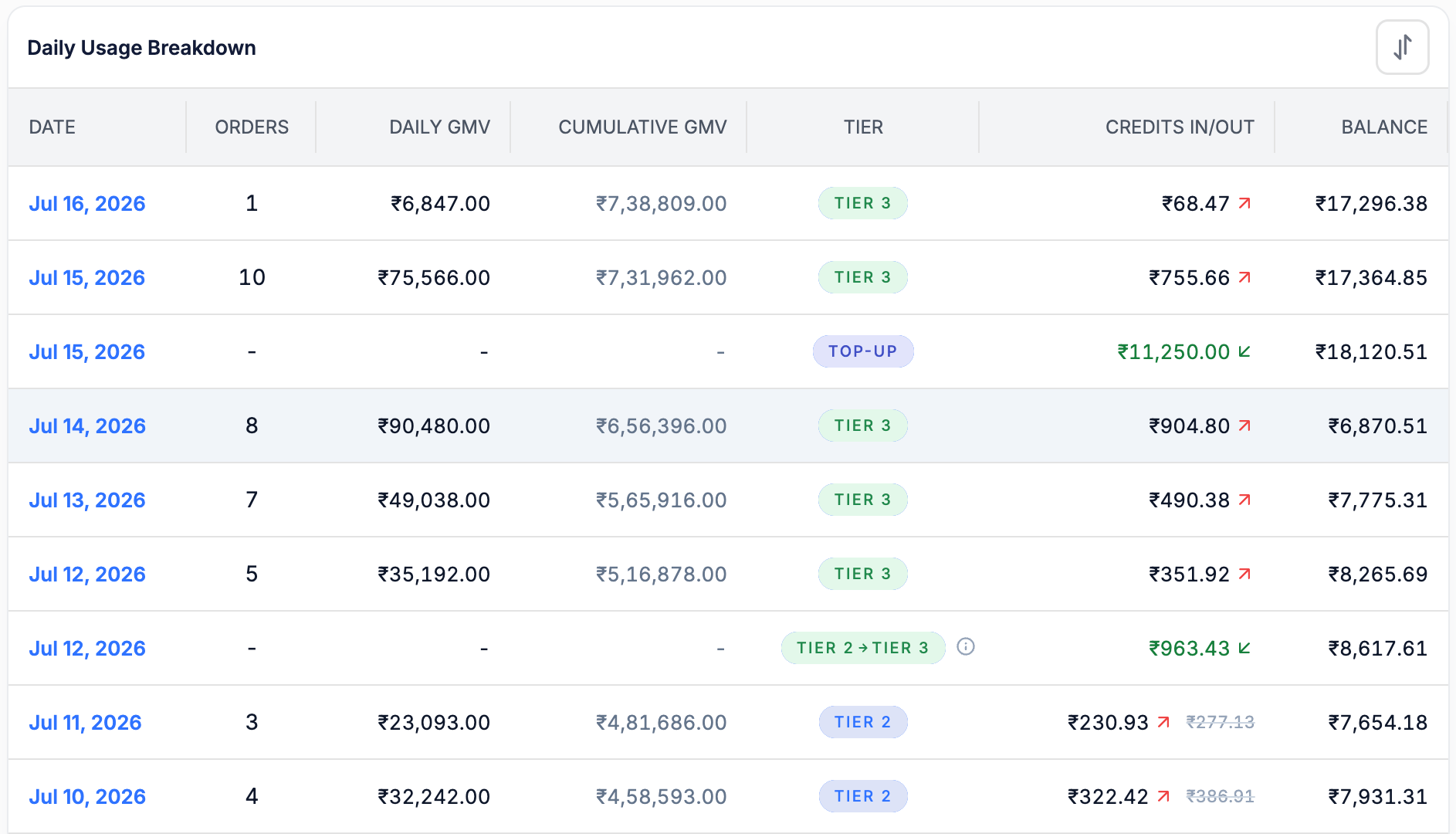 Three row types appear in this table:
1. **Usage rows** — one per day, tagged with the tier that applied (`TIER 3`, `TIER 2`, `TIER 1`).
2. **`TOP-UP` rows** — a recharge landing in your balance. Here `₹11,250.00` on Jul 15, taking the balance from ₹6,870.51 to ₹18,120.51. Orders, GMV, and tier are blank because a top-up isn't usage.
3. **Tier transition rows** — tagged `TIER 2 → TIER 3`, carrying the reconciliation credit or debit for the crossing. Hover the ⓘ icon for the breakdown.
Green amounts with an inward arrow add to your balance (top-ups, reconciliation credits). Amounts with an outward arrow reduce it (daily charges, reconciliation debits).
## How to add credits
In your FlexyPe dashboard, go to **Settings**.
Open the **Billing & Usage** page.
Use the **Add Credits** button in the top-right corner and complete the payment.
**Available Credits** in the left navigation is a shortcut to the same flow.
Three row types appear in this table:
1. **Usage rows** — one per day, tagged with the tier that applied (`TIER 3`, `TIER 2`, `TIER 1`).
2. **`TOP-UP` rows** — a recharge landing in your balance. Here `₹11,250.00` on Jul 15, taking the balance from ₹6,870.51 to ₹18,120.51. Orders, GMV, and tier are blank because a top-up isn't usage.
3. **Tier transition rows** — tagged `TIER 2 → TIER 3`, carrying the reconciliation credit or debit for the crossing. Hover the ⓘ icon for the breakdown.
Green amounts with an inward arrow add to your balance (top-ups, reconciliation credits). Amounts with an outward arrow reduce it (daily charges, reconciliation debits).
## How to add credits
In your FlexyPe dashboard, go to **Settings**.
Open the **Billing & Usage** page.
Use the **Add Credits** button in the top-right corner and complete the payment.
**Available Credits** in the left navigation is a shortcut to the same flow.
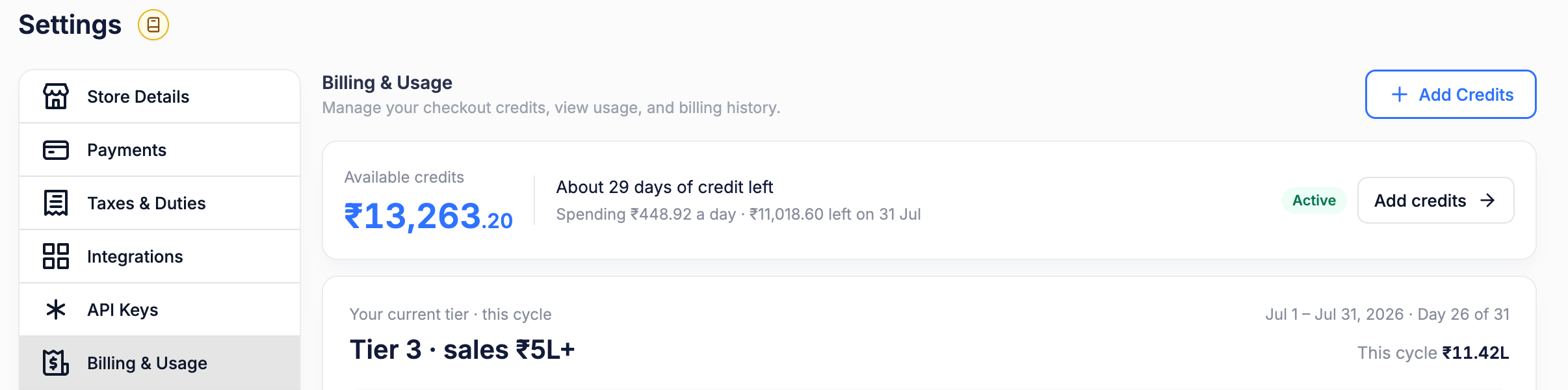 After a successful recharge, the new balance appears under **Available Credits** and a `TOP-UP` row appears in your usage history.
## GST and taxes
**GST at 18% is added on top of your recharge amount.** The credits added to your balance equal the pre-tax amount you chose.
| Line | Amount |
| ----------------------------- | ------------- |
| Credits added to your balance | ₹1,000.00 |
| GST @ 18% | ₹180.00 |
| **Total you pay** | **₹1,180.00** |
* Your invoice shows the **sub-total**, **GST**, and **total** as separate lines, along with any plan or add-on items billed in the same invoice.
* **Promotional or bonus credits are not taxed** — GST applies only to the amount you pay for.
* Add your **GSTIN** under [Store Details](/handbook/settings/storedetails) so it appears on your invoices and you can claim input credit.
Invoices are available on the **Billing & Usage** page. Always reconcile against the invoice — it is the authoritative breakdown for your account.
## Recharge and balance requirements
### If you have an outstanding amount
Your recharge must cover the outstanding amount **and** leave a minimum balance of ₹2,000:
```text theme={null}
Required recharge = Outstanding amount + ₹2,000 minimum balance
```
### How much to recharge
```text theme={null}
Recommended recharge = Estimated monthly charges + 4–5 days of expected charges
```
The buffer keeps your checkout running on days when GMV or usage spikes above your estimate.
If your balance runs out, billing has nothing to deduct from. Recharge before **days of credit left** gets short — the balance strip tells you both your daily spend and your projected balance at cycle end.
## Where to view your billing plan
Go to **Settings → Billing & Usage**. Everything about your billing lives on this one page:
After a successful recharge, the new balance appears under **Available Credits** and a `TOP-UP` row appears in your usage history.
## GST and taxes
**GST at 18% is added on top of your recharge amount.** The credits added to your balance equal the pre-tax amount you chose.
| Line | Amount |
| ----------------------------- | ------------- |
| Credits added to your balance | ₹1,000.00 |
| GST @ 18% | ₹180.00 |
| **Total you pay** | **₹1,180.00** |
* Your invoice shows the **sub-total**, **GST**, and **total** as separate lines, along with any plan or add-on items billed in the same invoice.
* **Promotional or bonus credits are not taxed** — GST applies only to the amount you pay for.
* Add your **GSTIN** under [Store Details](/handbook/settings/storedetails) so it appears on your invoices and you can claim input credit.
Invoices are available on the **Billing & Usage** page. Always reconcile against the invoice — it is the authoritative breakdown for your account.
## Recharge and balance requirements
### If you have an outstanding amount
Your recharge must cover the outstanding amount **and** leave a minimum balance of ₹2,000:
```text theme={null}
Required recharge = Outstanding amount + ₹2,000 minimum balance
```
### How much to recharge
```text theme={null}
Recommended recharge = Estimated monthly charges + 4–5 days of expected charges
```
The buffer keeps your checkout running on days when GMV or usage spikes above your estimate.
If your balance runs out, billing has nothing to deduct from. Recharge before **days of credit left** gets short — the balance strip tells you both your daily spend and your projected balance at cycle end.
## Where to view your billing plan
Go to **Settings → Billing & Usage**. Everything about your billing lives on this one page:
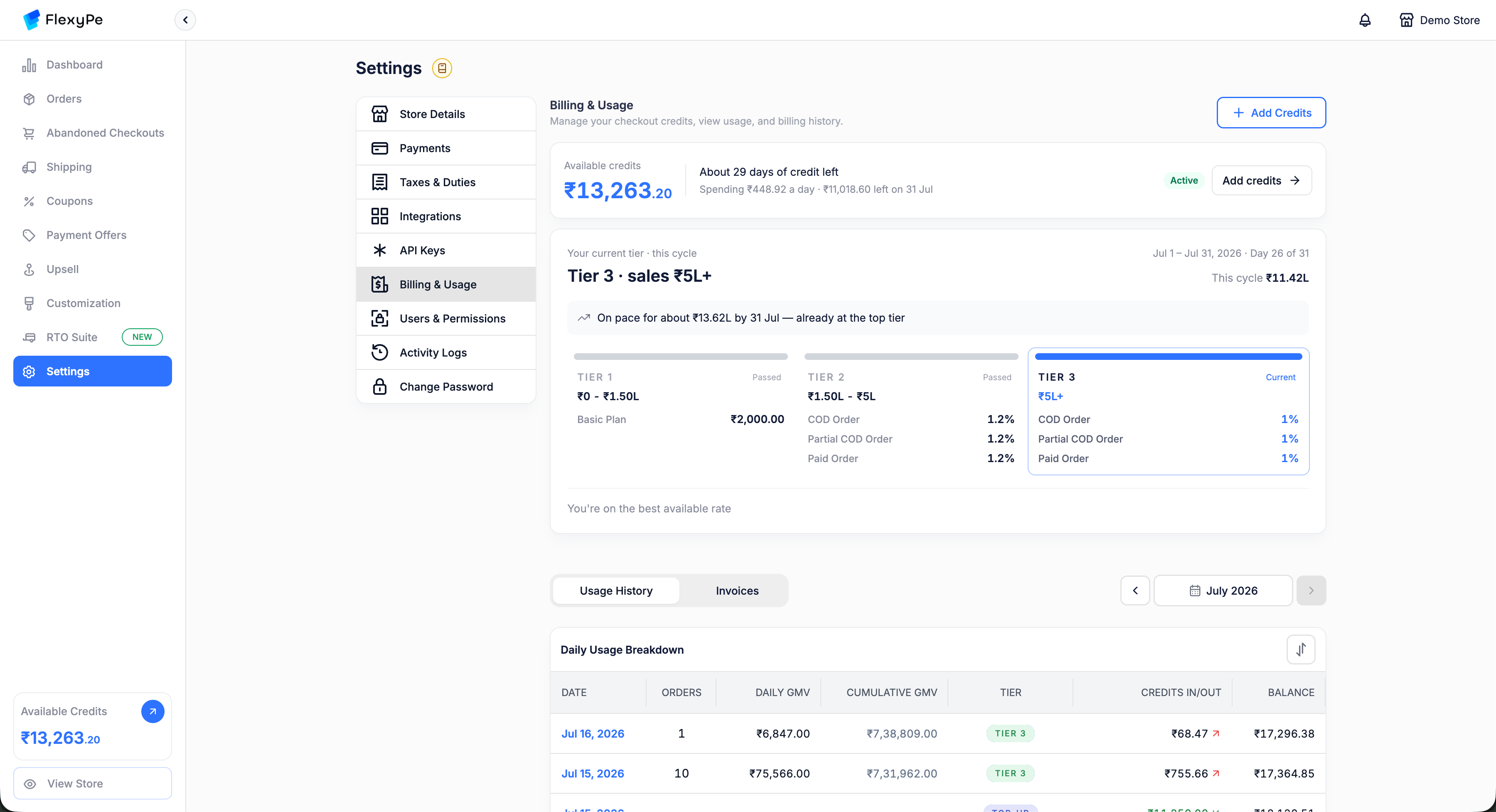 | Where on the page | What you get |
| --------------------- | ------------------------------------------------------------------------------------------------------------- |
| Balance strip (top) | Available credits, days of credit left, daily spend, projected cycle-end balance, account status, Add Credits |
| Tier card (middle) | Current tier, cycle dates and day count, cumulative sales, pace projection, every tier and its rates |
| **Usage History** tab | Daily Usage Breakdown for the selected month |
| **Invoices** tab | Invoices for the selected month, including the GST breakdown |
| Month picker | Switch cycles to review an earlier month |
## Billing analytics
The balance strip is your early-warning system — it shows a shortfall coming before it happens.
| Where on the page | What you get |
| --------------------- | ------------------------------------------------------------------------------------------------------------- |
| Balance strip (top) | Available credits, days of credit left, daily spend, projected cycle-end balance, account status, Add Credits |
| Tier card (middle) | Current tier, cycle dates and day count, cumulative sales, pace projection, every tier and its rates |
| **Usage History** tab | Daily Usage Breakdown for the selected month |
| **Invoices** tab | Invoices for the selected month, including the GST breakdown |
| Month picker | Switch cycles to review an earlier month |
## Billing analytics
The balance strip is your early-warning system — it shows a shortfall coming before it happens.
 | On screen | What it means |
| ------------------------------------ | ---------------------------------------------------------------- |
| **Available credits** — `₹13,263.20` | Balance currently available for billing deductions |
| **About 29 days of credit left** | Runway — how long the balance lasts at the current rate of spend |
| **Spending ₹448.92 a day** | Average daily burn |
| **₹11,018.60 left on 31 Jul** | Projected balance at the end of the current cycle |
| **Active** | Account status — billing is running normally |
How to read them:
* A rising **daily spend** means credits are being consumed faster — usually because sales are growing or you've moved up a tier.
* A **positive projected balance** means your credits are expected to last through the cycle.
* **Days of credit left** tells you when to recharge.
* If the projected balance is low or negative, recharge now.
## Daily usage breakdown
The **Daily Usage Breakdown** table shows exactly how each day's charge was calculated.
| Column | What it means |
| ------------------ | ------------------------------------------------------------------------------------ |
| **Date** | The date usage was recorded |
| **Orders** | Orders processed that day |
| **Daily GMV** | GMV generated that day |
| **Cumulative GMV** | Total GMV from the start of the cycle through that date |
| **Tier** | Tier applicable to the cumulative GMV — or `TOP-UP` / a `TIER X → TIER Y` transition |
| **Credits in/out** | The amount added or deducted that day |
| **Balance** | Balance after that day's charge or adjustment |
A row for day X appears on the morning of day X+1, because the charge for day X is calculated using cumulative GMV through the end of day X.
| On screen | What it means |
| ------------------------------------ | ---------------------------------------------------------------- |
| **Available credits** — `₹13,263.20` | Balance currently available for billing deductions |
| **About 29 days of credit left** | Runway — how long the balance lasts at the current rate of spend |
| **Spending ₹448.92 a day** | Average daily burn |
| **₹11,018.60 left on 31 Jul** | Projected balance at the end of the current cycle |
| **Active** | Account status — billing is running normally |
How to read them:
* A rising **daily spend** means credits are being consumed faster — usually because sales are growing or you've moved up a tier.
* A **positive projected balance** means your credits are expected to last through the cycle.
* **Days of credit left** tells you when to recharge.
* If the projected balance is low or negative, recharge now.
## Daily usage breakdown
The **Daily Usage Breakdown** table shows exactly how each day's charge was calculated.
| Column | What it means |
| ------------------ | ------------------------------------------------------------------------------------ |
| **Date** | The date usage was recorded |
| **Orders** | Orders processed that day |
| **Daily GMV** | GMV generated that day |
| **Cumulative GMV** | Total GMV from the start of the cycle through that date |
| **Tier** | Tier applicable to the cumulative GMV — or `TOP-UP` / a `TIER X → TIER Y` transition |
| **Credits in/out** | The amount added or deducted that day |
| **Balance** | Balance after that day's charge or adjustment |
A row for day X appears on the morning of day X+1, because the charge for day X is calculated using cumulative GMV through the end of day X.
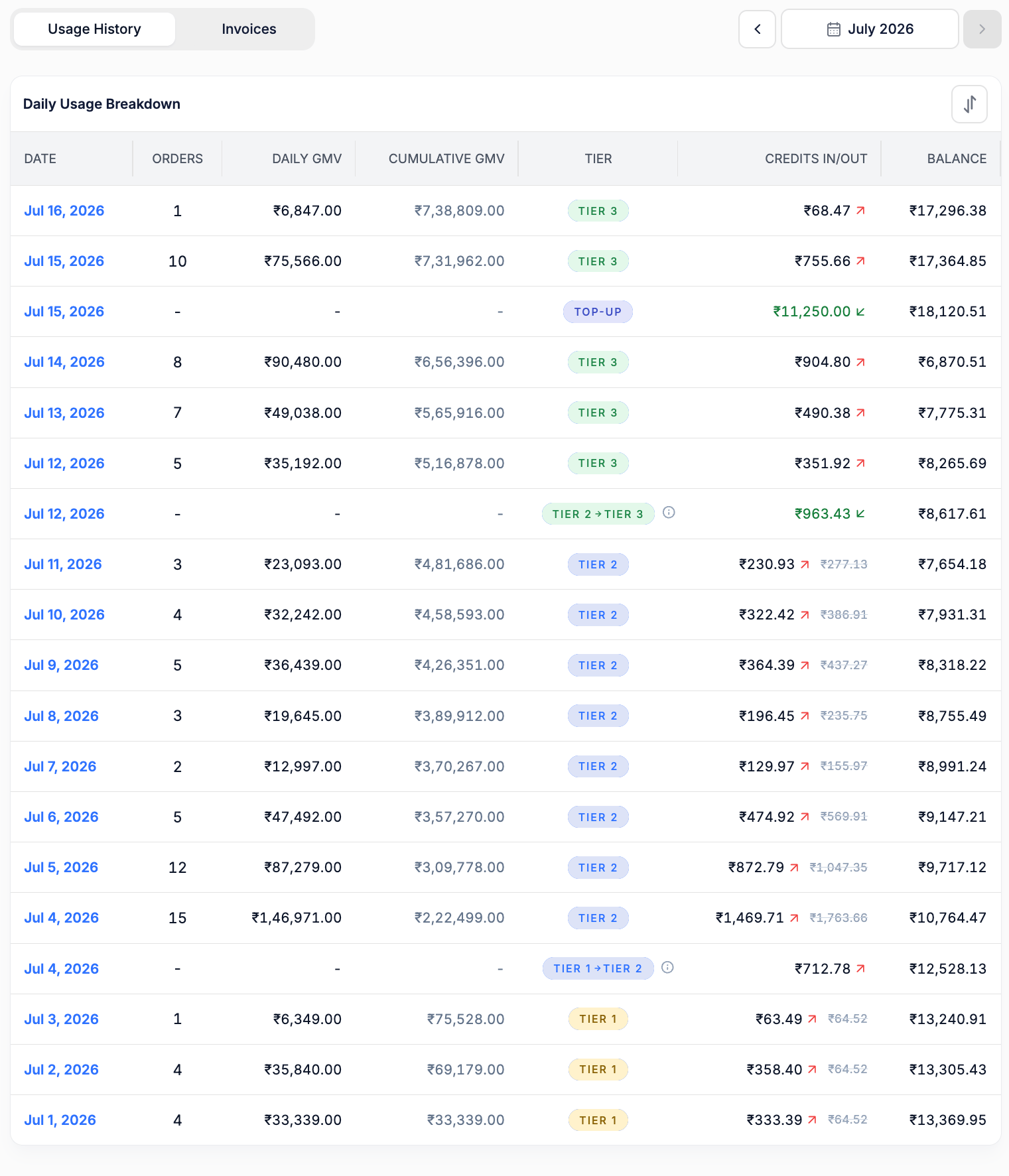 Reading it bottom to top follows the cycle forward in time: the account starts in `TIER 1` on Jul 1, crosses into `TIER 2` on Jul 4 and `TIER 3` on Jul 12 — each crossing getting its own transition row — and takes a top-up on Jul 15.
Use the month picker above the table to review an earlier cycle, and the sort control in the table header to flip the date order.
## Dashboard terms explained
Every term below is a label you'll actually see on **Settings → Billing & Usage**.
| On screen | Meaning |
| ------------------------------------- | --------------------------------------------------------------------------------------- |
| **Available credits** | Your usable prepaid balance |
| **About N days of credit left** | Runway — how long the balance lasts at your current rate of spend |
| **Spending ₹X a day** | Average daily burn across the cycle so far |
| **₹X left on ``** | Projected balance at the end of the current cycle |
| **Active** | Account status — billing is running normally |
| **Your current tier · this cycle** | The tier your cumulative sales have reached |
| **Day N of M** | Where you are in the billing cycle |
| **This cycle ₹X** | Cumulative sales for the cycle so far |
| **On pace for about ₹X by ``** | Projected cycle sales at the current rate — an early signal of a tier change |
| **Passed** / **Current** | Tier states on the tier cards — tiers you've moved beyond, and the one you're on |
| **You're on the best available rate** | You're on the lowest-priced tier available to your account |
| **Basic Plan** | The flat plan amount for the lowest tier, allocated across the days of the month |
| **COD / Partial COD / Paid Order** | Payment types a tier can price differently |
| **GMV** | Gross Merchandise Value — order value processed through FlexyPe checkout |
| **Daily GMV** | GMV generated on that date |
| **Cumulative GMV** | GMV totalled from the first day of the cycle to that date — this is what sets your tier |
| **Threshold** | The sales value where one tier ends and the next begins |
| **`TIER X → TIER Y`** | A tier transition row, carrying the reconciliation credit or debit for the crossing |
| **`TOP-UP`** | A recharge landing in your balance |
| **Credits in/out** | The amount added to or deducted from your balance on that row |
| **Balance** | Your balance after that row's charge or adjustment |
| **Reconciliation** | Recalculation of the cycle's charges after a tier change |
| **Outstanding amount** | Charges that couldn't be deducted because the balance was insufficient |
| **Billing cycle** | The period your sales and charges are measured over |
## Frequently asked questions
No. You pay only for the days you use the service. On a ₹2,000 plan in a 30-day month the daily charge is ₹2,000 ÷ 30 = ₹66.67, so going live on June 14 means the plan is charged for June 14–30 — 17 days.
No. The plan is the same. Only the timing changed: from month-end postpaid billing to ongoing prepaid calculation and collection.
With your first processed order.
Your cycle is recalculated using the higher tier, and the difference is applied as a credit or a debit. Subsequent daily charges use the higher tier.
Yes. Depending on your plan you may have Tier 1, Tier 2, Tier 3, or more. All of them are listed on the tier card.
From Tier 2 upward, rates are quoted per payment type — **COD Order**, **Partial COD Order**, and **Paid Order** can each carry a different percentage. See [your selling plan](#your-selling-plan).
A recharge that landed in your balance. Orders, GMV, and tier are blank on that row because a top-up isn't usage.
They reconcile what was already charged against what applies to your updated tier when cumulative GMV moves from one tier to another.
Your next recharge covers the outstanding amount and must still leave at least ₹2,000 as available balance.
Estimate your monthly charges and add a buffer of roughly 4–5 days of expected charges.
No — 18% GST is added on top. A ₹1,000 recharge is billed as ₹1,180, and ₹1,000 lands in your balance.
## Summary
* Your selling plan is unchanged; only the billing timing moved from postpaid to prepaid.
* Charging starts with your first processed order.
* The lowest tier's plan amount is divided across the 30 or 31 days of the month, and you pay only for days used.
* Higher tiers charge a percentage of order value, priced separately for COD, Partial COD, and Paid orders.
* Cumulative sales determine your tier; crossing a threshold triggers reconciliation as a credit or debit on its own row.
* 18% GST is added on top of your recharge.
* A recharge must clear any outstanding amount and leave ₹2,000 minimum balance.
* Keep a buffer of 4–5 days of expected charges so checkout is never interrupted.
Exact tiers, thresholds, plan amounts, and rates depend on your merchant configuration. Check **Settings → Billing & Usage** for the values that apply to you.
## Need help?
Questions on an invoice, a charge, or a reconciliation entry
Answers across onboarding, checkout, payments, and the dashboard
Reading it bottom to top follows the cycle forward in time: the account starts in `TIER 1` on Jul 1, crosses into `TIER 2` on Jul 4 and `TIER 3` on Jul 12 — each crossing getting its own transition row — and takes a top-up on Jul 15.
Use the month picker above the table to review an earlier cycle, and the sort control in the table header to flip the date order.
## Dashboard terms explained
Every term below is a label you'll actually see on **Settings → Billing & Usage**.
| On screen | Meaning |
| ------------------------------------- | --------------------------------------------------------------------------------------- |
| **Available credits** | Your usable prepaid balance |
| **About N days of credit left** | Runway — how long the balance lasts at your current rate of spend |
| **Spending ₹X a day** | Average daily burn across the cycle so far |
| **₹X left on ``** | Projected balance at the end of the current cycle |
| **Active** | Account status — billing is running normally |
| **Your current tier · this cycle** | The tier your cumulative sales have reached |
| **Day N of M** | Where you are in the billing cycle |
| **This cycle ₹X** | Cumulative sales for the cycle so far |
| **On pace for about ₹X by ``** | Projected cycle sales at the current rate — an early signal of a tier change |
| **Passed** / **Current** | Tier states on the tier cards — tiers you've moved beyond, and the one you're on |
| **You're on the best available rate** | You're on the lowest-priced tier available to your account |
| **Basic Plan** | The flat plan amount for the lowest tier, allocated across the days of the month |
| **COD / Partial COD / Paid Order** | Payment types a tier can price differently |
| **GMV** | Gross Merchandise Value — order value processed through FlexyPe checkout |
| **Daily GMV** | GMV generated on that date |
| **Cumulative GMV** | GMV totalled from the first day of the cycle to that date — this is what sets your tier |
| **Threshold** | The sales value where one tier ends and the next begins |
| **`TIER X → TIER Y`** | A tier transition row, carrying the reconciliation credit or debit for the crossing |
| **`TOP-UP`** | A recharge landing in your balance |
| **Credits in/out** | The amount added to or deducted from your balance on that row |
| **Balance** | Your balance after that row's charge or adjustment |
| **Reconciliation** | Recalculation of the cycle's charges after a tier change |
| **Outstanding amount** | Charges that couldn't be deducted because the balance was insufficient |
| **Billing cycle** | The period your sales and charges are measured over |
## Frequently asked questions
No. You pay only for the days you use the service. On a ₹2,000 plan in a 30-day month the daily charge is ₹2,000 ÷ 30 = ₹66.67, so going live on June 14 means the plan is charged for June 14–30 — 17 days.
No. The plan is the same. Only the timing changed: from month-end postpaid billing to ongoing prepaid calculation and collection.
With your first processed order.
Your cycle is recalculated using the higher tier, and the difference is applied as a credit or a debit. Subsequent daily charges use the higher tier.
Yes. Depending on your plan you may have Tier 1, Tier 2, Tier 3, or more. All of them are listed on the tier card.
From Tier 2 upward, rates are quoted per payment type — **COD Order**, **Partial COD Order**, and **Paid Order** can each carry a different percentage. See [your selling plan](#your-selling-plan).
A recharge that landed in your balance. Orders, GMV, and tier are blank on that row because a top-up isn't usage.
They reconcile what was already charged against what applies to your updated tier when cumulative GMV moves from one tier to another.
Your next recharge covers the outstanding amount and must still leave at least ₹2,000 as available balance.
Estimate your monthly charges and add a buffer of roughly 4–5 days of expected charges.
No — 18% GST is added on top. A ₹1,000 recharge is billed as ₹1,180, and ₹1,000 lands in your balance.
## Summary
* Your selling plan is unchanged; only the billing timing moved from postpaid to prepaid.
* Charging starts with your first processed order.
* The lowest tier's plan amount is divided across the 30 or 31 days of the month, and you pay only for days used.
* Higher tiers charge a percentage of order value, priced separately for COD, Partial COD, and Paid orders.
* Cumulative sales determine your tier; crossing a threshold triggers reconciliation as a credit or debit on its own row.
* 18% GST is added on top of your recharge.
* A recharge must clear any outstanding amount and leave ₹2,000 minimum balance.
* Keep a buffer of 4–5 days of expected charges so checkout is never interrupted.
Exact tiers, thresholds, plan amounts, and rates depend on your merchant configuration. Check **Settings → Billing & Usage** for the values that apply to you.
## Need help?
Questions on an invoice, a charge, or a reconciliation entry
Answers across onboarding, checkout, payments, and the dashboard