> ## Documentation Index
> Fetch the complete documentation index at: https://docs.flexype.io/llms.txt
> Use this file to discover all available pages before exploring further.
# Abandoned Cart
> Track and recover lost sales by monitoring abandoned checkout sessions in FlexyPe.
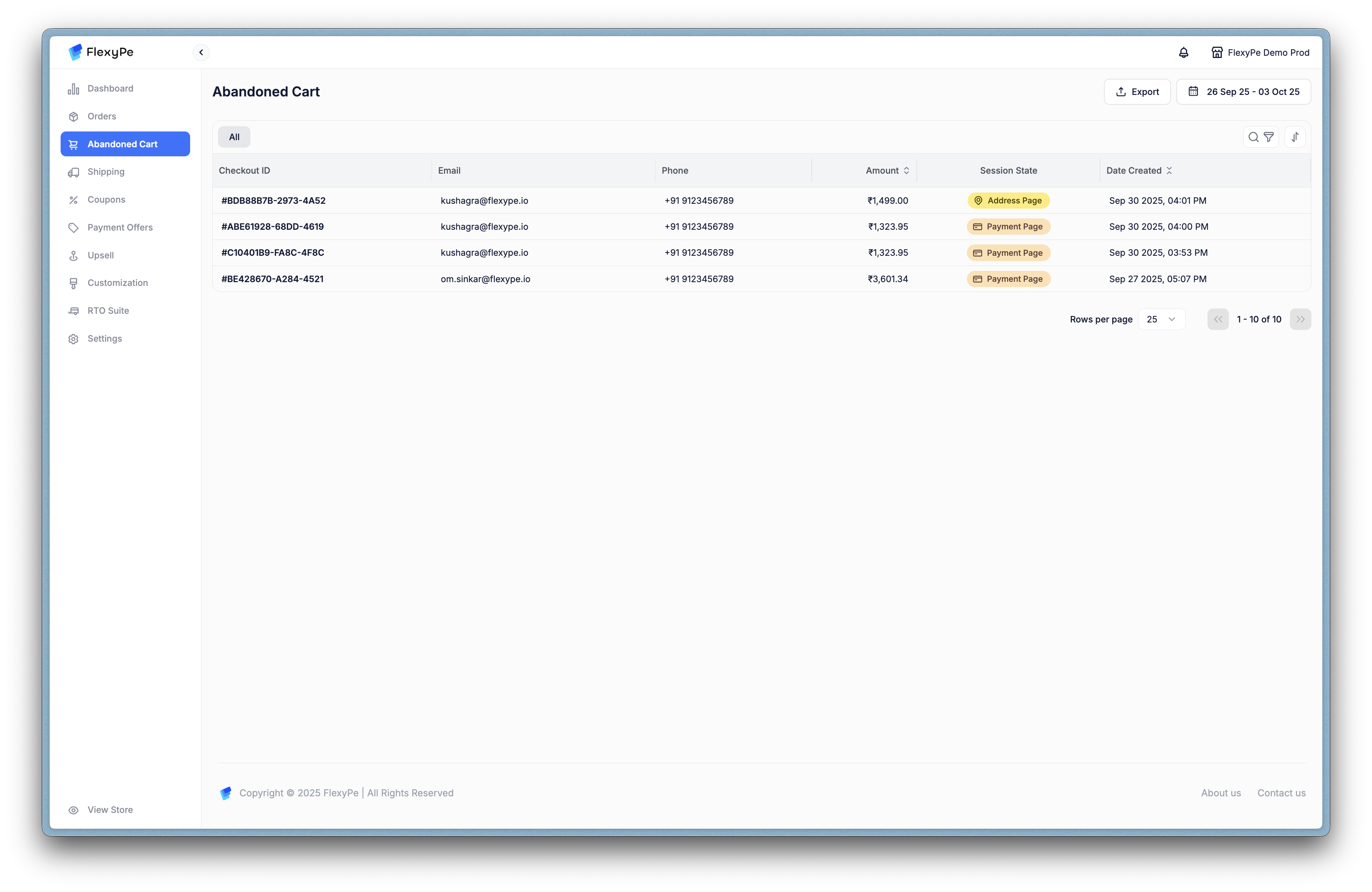
The **Abandoned Cart** section helps you identify and recover potential lost sales when customers initiate checkout but do not complete it.
## Key Data Shown
* **Checkout ID** – Unique identifier for each abandoned checkout.
* **Email & Phone** – Customer contact information for follow-ups.
* **Amount** – Value of the abandoned cart.
* **Session State** – The stage where the customer dropped off (e.g., Address Page, Payment Page).
* **Date Created** – Timestamp of when the cart was abandoned.
## Why It Matters
Tracking abandonment helps you act quickly:
* Trigger **automated reminder campaigns** with incentives.
* Spot friction points in checkout (e.g., if many abandon on the Payment Page).
* Recover high-intent buyers without additional ad spend.
***
 ## Key Data Shown
* **Checkout ID** – Unique identifier for each abandoned checkout.
* **Email & Phone** – Customer contact information for follow-ups.
* **Amount** – Value of the abandoned cart.
* **Session State** – The stage where the customer dropped off (e.g., Address Page, Payment Page).
* **Date Created** – Timestamp of when the cart was abandoned.
## Why It Matters
Tracking abandonment helps you act quickly:
* Trigger **automated reminder campaigns** with incentives.
* Spot friction points in checkout (e.g., if many abandon on the Payment Page).
* Recover high-intent buyers without additional ad spend.
***
## Key Data Shown
* **Checkout ID** – Unique identifier for each abandoned checkout.
* **Email & Phone** – Customer contact information for follow-ups.
* **Amount** – Value of the abandoned cart.
* **Session State** – The stage where the customer dropped off (e.g., Address Page, Payment Page).
* **Date Created** – Timestamp of when the cart was abandoned.
## Why It Matters
Tracking abandonment helps you act quickly:
* Trigger **automated reminder campaigns** with incentives.
* Spot friction points in checkout (e.g., if many abandon on the Payment Page).
* Recover high-intent buyers without additional ad spend.
***